

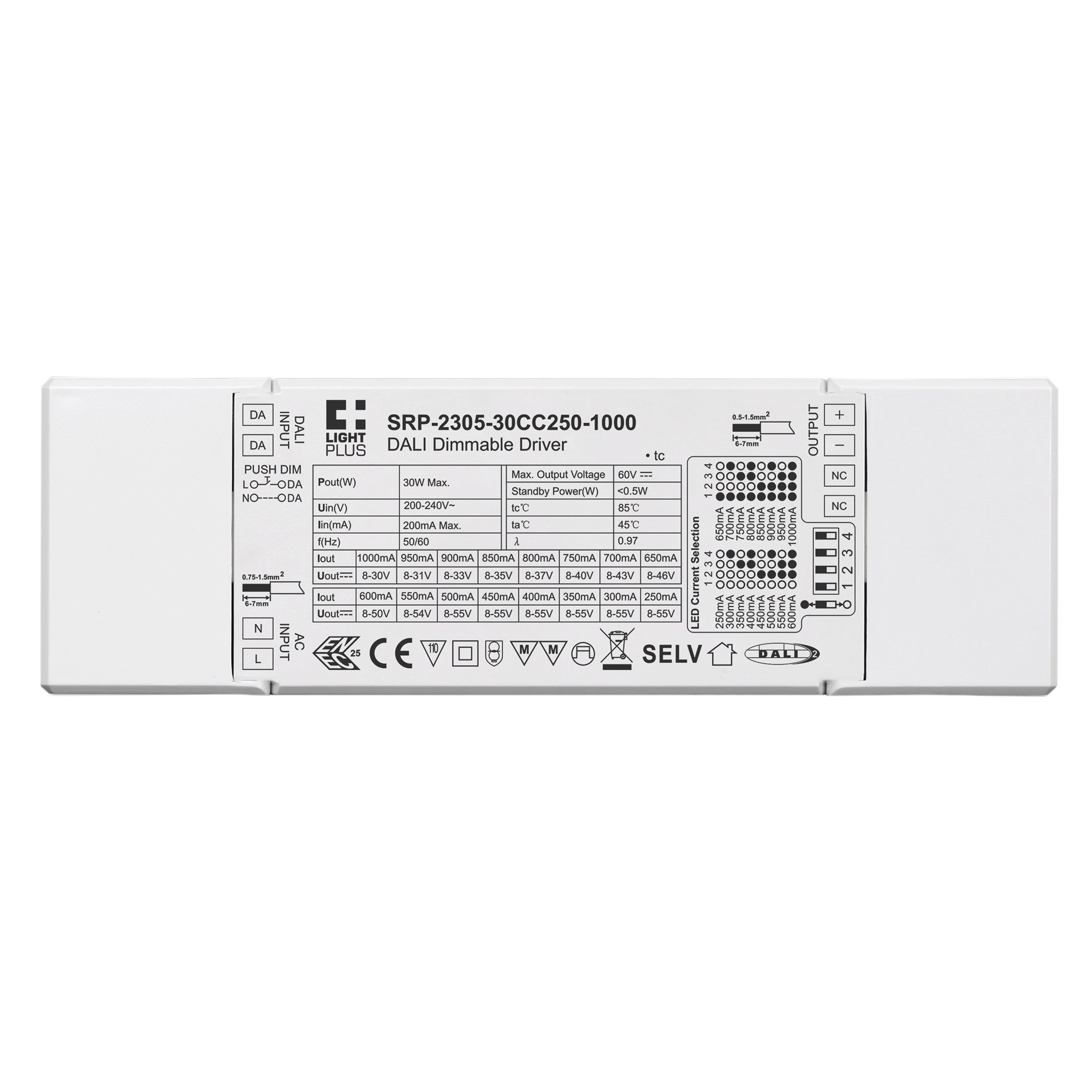
SRP-2305-30CC250-1000
Product Data
- Dimmable DALI DT6 LED driver
- In compliance with IEC 62386-101:2014, IEC 62386-102:2014, IEC 62386-207 Ed2
- Built-in DALI-2 interface, DALI DT6 device
- Hybrid dimming method, smooth and deep dimming to 0.1%, flicker free
- 1 channel constant current output, max. output power 30W
- Output current 250mA-1000mA selectable by dip switches
- Standby power consumption less than 0.5W
- Class 2 power supply, full isolated plastic case
- High power factor and efficiency
- DALI DT6 device to control ON/OFF,light intensity output via a single DALI address
- Compatible with universal DALI masters that support DT6 commands
- IP20 rating, suitable for indoor LED lighting applications
- 5 years warranty















1. DALI Address Assigned by DALI Masters
1 DALI address can be assigned by DALI Master controller compatible DALI Masters for specific operations.
2. Power On Level
Power on level is a DALI parameter that defines the level of a control gear after power is restored. The factory default power on level for this driver is 100, which means the driver will be at 100% intensity when power is restored.
3.Push Dimmer Mode
While connected with a AC PUSH, it means Push Dimmer Mode, and operations under Push Dimmer Mode are as follows: 1.1. Click the button to switch ON/OFF 1.2. Press and hold down the button to increase or decrease light intensity to desired level and release it, then repeat the operation to adjust light intensity to opposite direction. The dimming range is from 0.1% to 100%.
1.3. Memory function after power off or power failure enables the device to memorize the status before power off while power on again.
1 DALI address can be assigned by DALI Master controller compatible DALI Masters for specific operations.
2. Power On Level
Power on level is a DALI parameter that defines the level of a control gear after power is restored. The factory default power on level for this driver is 100, which means the driver will be at 100% intensity when power is restored.
3.Push Dimmer Mode
While connected with a AC PUSH, it means Push Dimmer Mode, and operations under Push Dimmer Mode are as follows: 1.1. Click the button to switch ON/OFF 1.2. Press and hold down the button to increase or decrease light intensity to desired level and release it, then repeat the operation to adjust light intensity to opposite direction. The dimming range is from 0.1% to 100%.
1.3. Memory function after power off or power failure enables the device to memorize the status before power off while power on again.